
Open to work
Making connected-car onboarding simple – across eight manufacturers.
I turned changing manufacturer processes into three reusable authorisation paths, helping new members connect a compatible car without waiting for a Miles Tracker.


Role
Product designer
Results
Most new members connected immediately after purchase or within 24h.
A reusable structure that was fast to build and adapt.
Context
By Miles makes car insurance fairer for lower-mileage drivers: a fixed annual premium covers the car while parked, and a per-mile rate covers driving. Normally, members waited for a Miles Tracker device to arrive and plugged it into their car.
Connect offered a hardware-free alternative. With a compatible connected car, members could give permission for mileage to come directly from the vehicle. This was industry-first work in connected pay-by-mile insurance, but making the connection was far from a single predictable journey.
The problem
Eight manufacturers. Different rules. Very little visibility.
Every manufacturer had its own authorisation process. Documentation was inconsistent; one lacked clear documentation altogether. None showed us their customer-facing experience, and access to screenshots, recordings, test cars and environments was limited.
These were beta processes that changed and broke frequently. A detailed screenshot walkthrough could be out of date before we shipped it. We also couldn't assume members already had a manufacturer account.
A deliberate research trade-off
For the initial build, we chose not to recruit members to show us the manufacturer flows: arranging that access was complicated and could delay release. I needed to make the handover clear without pretending we controlled what happened on the manufacturer's side.
Mapping the requirements
I focused discovery on the information and decisions we needed to support.
What does each process require?
An account, access to the car, an email, or a login?
Where do the experiences overlap?
Which steps can share content, views and logic?
Where does consent happen?
Some manufacturers relied on us to obtain it; others asked at handover. Either way, we needed a consistent explicit-consent step of our own.
What will stay useful when the UI changes?
Prepare people for the task, without maintaining a screenshot for every manufacturer variant.
Providing Clarity before the handover
I kept the part we owned consistent: explain what is about to happen, capture explicit consent, then give only the next steps relevant to that manufacturer.



32
32
How we use your data.
24
For your policy to work, we need your consent to access some information from your Mercedes me account:
24

Mileometer Reading
To check your daily mileage
8

GPS Position
To help track your car if it’s stolen
24
Read our privacy notice for the full list of what data we use, how we use it and how we keep it secure.
32
I need help
4

24
16
24
I accept
8

24
16
24
32
Ask for explicit permission
Manufacturers handled consent differently. Our own consent screen gave every member a clear, consistent point to agree before continuing. It explains the data permissions and links to the privacy notice rather than a vague request to connect.
It also covered our use of vehicle location GPS data for theft recovery.
Using systems-thinking to avoid excessive design variants
Across all eight manufacturers, the underlying task was the same: explain the data permission, capture explicit consent, then hand off to the relevant manufacturer flow. I structured this as three reusable authorisation patterns rather than eight variants.
32
32
Connect your car.
24
To count your miles, we need your car to start talking to us.
Please log into your Mercedes me account.
24


32
I need help
4

24
16
24
Log into Mercedes me
8

24
16
24
32
1. Log in through a webview
Before opening the manufacturer's login, explain why the member is going there and which account they need. For Mercedes, that meant preparing them to use Mercedes me. A help link remained available throughout the webview route so they could reach Customer Experience.
32
32

48
Check your car’s entertainment system.
24
You should soon see a notification from us.
Just follow the instructions on the screen, then pop back here to finish up.
24

16
Waiting for connection…
32
I can’t see a notification
4

24
24
24
Send again
8
24
24
24
32
2. Authorise in the car
Some members needed to accept a notification on the car's entertainment system. The flow prepares them to access the car, explains where to look, then asks them to return to finish up. A waiting state and resend option account for the request not appearing first time.
32
32

48
Check your email.
24
You should see a message with a BMW CarData request.
Just follow the instructions you see there, then pop back here to finish up.
24

16
Waiting for connection…
32
I need help
4
24
24
24
Send again
8
24
24
24
32
3. Authorise by email
For the email route, the member is told to expect a manufacturer request – a BMW CarData message in this example – and to return after following its instructions. The same waiting-state structure supports a different kind of handover.
A small system for a changing brief
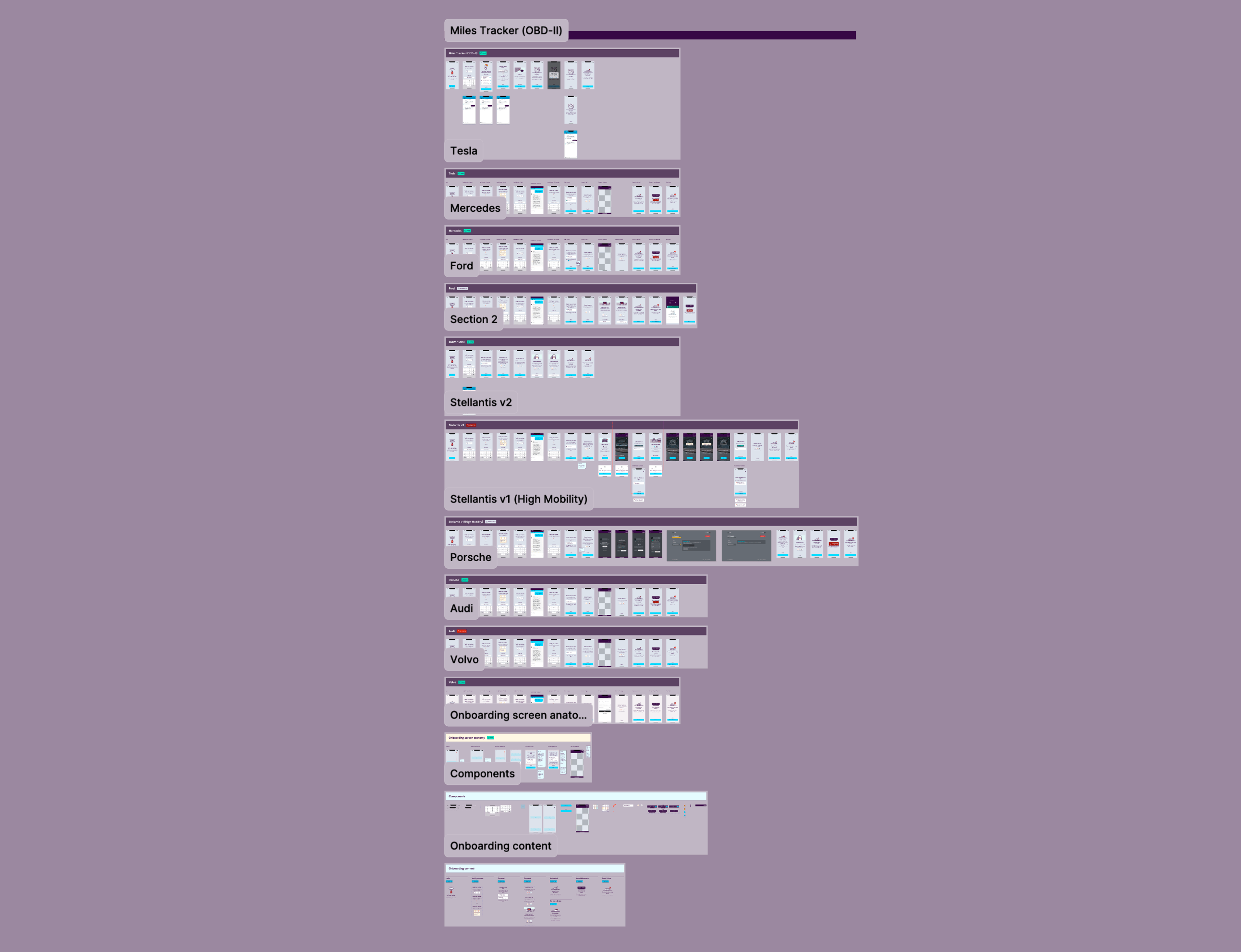
I built a component-based content structure and maintained high-fidelity flows and prototypes that could be duplicated and adapted for each manufacturer. Engineers could use a small set of views, components and logic rather than build eight separate flows.
The structure separated shared screen logic from manufacturer-specific instructions and connection state. When a beta process changed or broke, we could update the relevant content or route without redesigning the whole experience.
Three of the 8+ flows for each manufacturer. To keep everything in sync, every flow reused an overall page template component, with a small set of switchable “content” components for the main onboarding screen patterns.
Thinking about the whole experience
A manufacturer login is only useful if the member already has an account. I briefed CRM on welcome-email variants that encouraged new members to create a free manufacturer account before activating their policy, so account setup didn't arrive as a surprise at handover.
The emails explained the activation steps and offered the web dashboard as an alternative for members without a smartphone.
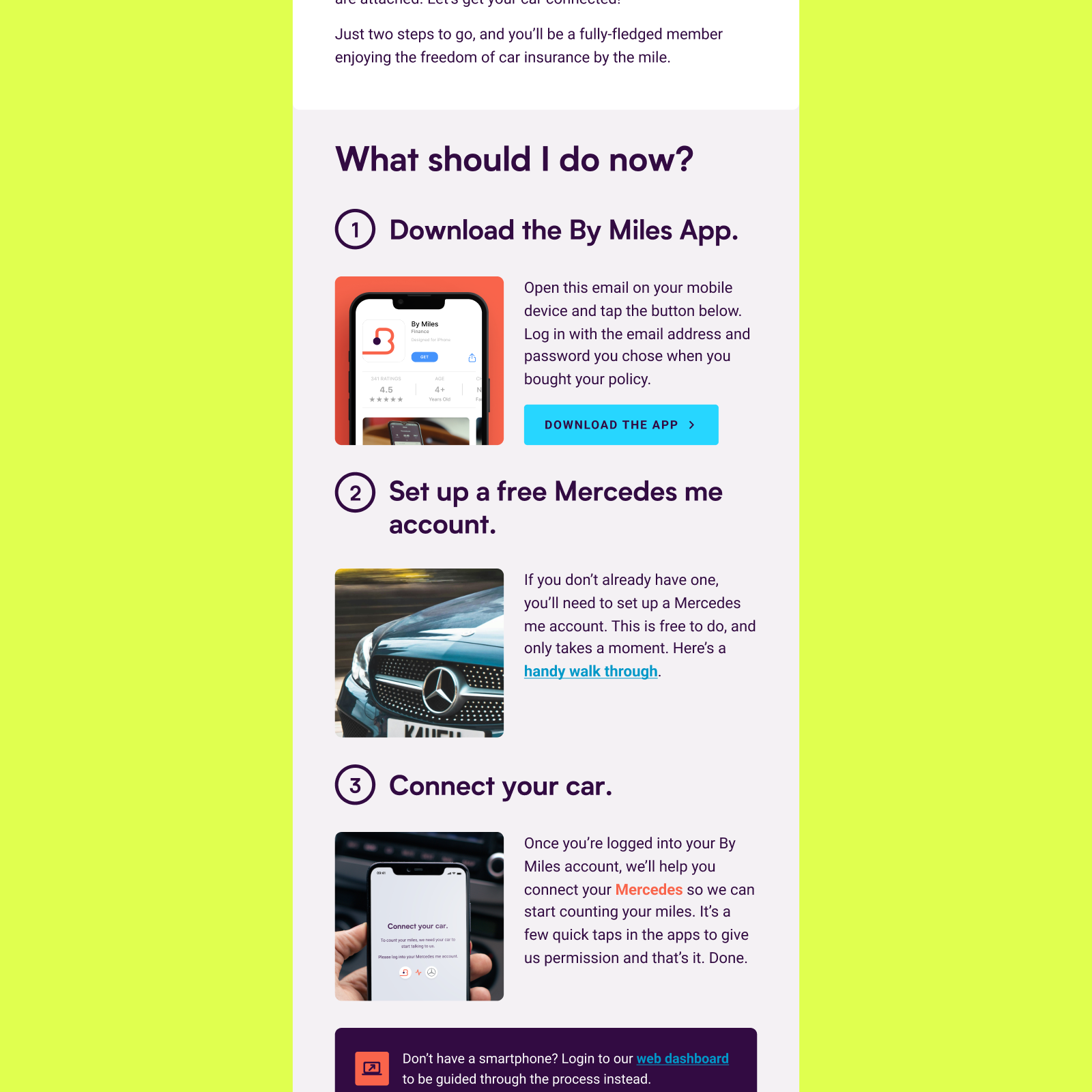
A crop of the welcome email that went out to new members, inviting them to set up a manufacturer account to ensure activation success.
Consistency beyond the app
The shared content components also supported web dashboard variants, keeping instructions in sync across channels. The welcome email signposted the dashboard for members without a smartphone; a different device shouldn't mean a different explanation.
The impact
The reusable structure made the flows fast to build and adapt as manufacturer beta processes changed or broke. It supported a quick UK go-to-market ahead of other insurance providers working in this area.
Connect
Immediately or within 24h
Most new members connected straight after buying a policy.
Miles Tracker
7-day average
Average activation time for the hardware-based route.
Less hardware friction
Compatible vehicles needed no tracker delivery, plugging in or hardware troubleshooting, avoiding the associated operational costs.
Useful beyond delivery.
The high-fidelity flows gave Customer Experience material for internal documentation and training.
Industry attention.
Connect attracted PR and industry coverage at launch.
© 2025 - 2026 Daniel van der Spuy
Get in touch:
hi@danvan.design
Connect with me on
Open to work
Making connected-car onboarding simple – across eight manufacturers.
I turned changing manufacturer processes into three reusable authorisation paths, helping new members connect a compatible car without waiting for a Miles Tracker.
Role
Product designer
Results
Strategic PR secured as a result of being the first UK usage-based insurer to use connected car technology.
Context
By Miles makes car insurance fairer for lower-mileage drivers: a fixed annual premium covers the car while parked, and a per-mile rate covers driving. Normally, members waited for a Miles Tracker device to arrive and plugged it into their car.
Connect offered a hardware-free alternative. With a compatible connected car, members could give permission for mileage to come directly from the vehicle. This was industry-first work in connected pay-by-mile insurance, but making the connection was far from a single predictable journey.
The problem
Eight manufacturers. Different rules. Very little visibility.
Every manufacturer had its own authorisation process. Documentation was inconsistent; one lacked clear documentation altogether. None showed us their customer-facing experience, and access to screenshots, recordings, test cars and environments was limited.
These were beta processes that changed and broke frequently. A detailed screenshot walkthrough could be out of date before we shipped it. We also couldn't assume members already had a manufacturer account.
A deliberate research trade-off
For the initial build, we chose not to recruit members to show us the manufacturer flows: arranging that access was complicated and could delay release. I needed to make the handover clear without pretending we controlled what happened on the manufacturer's side.
Mapping the requirements.
I focused discovery on the information and decisions we needed to support.
What does each process require?
An account, access to the car, an email, or a login?
Where do the experiences overlap?
Which steps can share content, views and logic?
Where does consent happen?
Some manufacturers relied on us to obtain it; others asked at handover. Either way, we needed a consistent explicit-consent step of our own.
What will stay useful when the UI changes?
Prepare people for the task, without maintaining a screenshot for every manufacturer variant.
Providing Clarity before the handover
I kept the part we owned consistent: explain what is about to happen, capture explicit consent, then give only the next steps relevant to that manufacturer.
32
32
How we use your data.
24
For your policy to work, we need your consent to access some information from your Mercedes me account:
24
Mileometer Reading
To check your daily mileage
8
GPS Position
To help track your car if it’s stolen
24
Read our privacy notice for the full list of what data we use, how we use it and how we keep it secure.
32
I need help
4
24
16
24
I accept
8
24
16
24
32
Ask for explicit permission
Manufacturers handled consent differently. Our own consent screen gave every member a clear, consistent point to agree before continuing. It explains the data permissions and links to the privacy notice rather than a vague request to connect.
It also covered our use of vehicle location GPS data for theft recovery.
Using systems-thinking to avoid excessive design variants
Across all eight manufacturers, the underlying task was the same: explain the data permission, capture explicit consent, then hand off to the relevant manufacturer flow. I structured this as three reusable authorisation patterns rather than eight variants.
32
32
Connect your car.
24
To count your miles, we need your car to start talking to us.
Please log into your Mercedes me account.
24
32
I need help
4
24
16
24
Log into Mercedes me
8
24
16
24
32
1. Log in through a webview
Before opening the manufacturer's login, explain why the member is going there and which account they need. For Mercedes, that meant preparing them to use Mercedes me. A help link remained available throughout the webview route so they could reach Customer Experience.
32
32
48
Check your car’s entertainment system.
24
You should soon see a notification from us.
Just follow the instructions on the screen, then pop back here to finish up.
24
16
Waiting for connection…
32
I can’t see a notification
4
24
24
24
Send again
8
24
24
24
32
2. Authorise in the car
Some members needed to accept a notification on the car's entertainment system. The flow prepares them to access the car, explains where to look, then asks them to return to finish up. A waiting state and resend option account for the request not appearing first time.
32
32
48
Check your email.
24
You should see a message with a BMW CarData request.
Just follow the instructions you see there, then pop back here to finish up.
24
16
Waiting for connection…
32
I need help
4
24
24
24
Send again
8
24
24
24
32
3. Authorise by email
For the email route, the member is told to expect a manufacturer request – a BMW CarData message in this example – and to return after following its instructions. The same waiting-state structure supports a different kind of handover.
A small system for a changing brief
I built a component-based content structure and maintained high-fidelity flows and prototypes that could be duplicated and adapted for each manufacturer. Engineers could use a small set of views, components and logic rather than build eight separate flows.
The structure separated shared screen logic from manufacturer-specific instructions and connection state. When a beta process changed or broke, we could update the relevant content or route without redesigning the whole experience.
Three of the 8+ flows for each manufacturer. To keep everything in sync, every flow reused an overall page template component, with a small set of switchable “content” components for the main onboarding screen patterns.
Thinking about the whole experience
A manufacturer login is only useful if the member already has an account. I briefed CRM on welcome-email variants that encouraged new members to create a free manufacturer account before activating their policy, so account setup didn't arrive as a surprise at handover.
The emails explained the activation steps and offered the web dashboard as an alternative for members without a smartphone.
A crop of the welcome email that went out to new members, inviting them to set up a manufacturer account to ensure activation success.
Consistency beyond the app
The shared content components also supported web dashboard variants, keeping instructions in sync across channels. The welcome email signposted the dashboard for members without a smartphone; a different device shouldn't mean a different explanation.
The impact
The reusable structure made the flows fast to build and adapt as manufacturer beta processes changed or broke. It supported a quick UK go-to-market ahead of other insurance providers working in this area.
Connect
Immediately or within 24h
Most new members connected straight after buying a policy.
Miles Tracker
7-day average
Average activation time for the hardware-based route.
Less hardware friction
Compatible vehicles needed no tracker delivery, plugging in or hardware troubleshooting, avoiding the associated operational costs.
Useful beyond delivery.
The high-fidelity flows gave Customer Experience material for internal documentation and training.
Industry attention.
Connect attracted PR and industry coverage at launch.
© 2025 - 2026 Daniel van der Spuy
Get in touch:
hi@danvan.design
Connect with me on
Open to work
Role
Product designer
Results
Most new members connected immediately after purchase or within 24h.
A reusable structure that was fast to build and adapt to new connected car partners.
PR received around being the first UK usage-based insurer to use connected car technology.
Making connected-car onboarding simple – across eight manufacturers.
I turned changing manufacturer processes into three reusable authorisation paths, helping new members connect a compatible car without waiting for a Miles Tracker.
Context
By Miles makes car insurance fairer for lower-mileage drivers: a fixed annual premium covers the car while parked, and a per-mile rate covers driving. Normally, members waited for a Miles Tracker device to arrive and plugged it into their car.
Connect offered a hardware-free alternative. With a compatible connected car, members could give permission for mileage to come directly from the vehicle. This was industry-first work in connected pay-by-mile insurance, but making the connection was far from a single predictable journey.
The problem
Eight manufacturers. Different rules. Very little visibility.
Every manufacturer had its own authorisation process. Documentation was inconsistent; one lacked clear documentation altogether. None showed us their customer-facing experience, and access to screenshots, recordings, test cars and environments was limited.
These were beta processes that changed and broke frequently. A detailed screenshot walkthrough could be out of date before we shipped it. We also couldn't assume members already had a manufacturer account.
A deliberate research trade-off
For the initial build, we chose not to recruit members to show us the manufacturer flows: arranging that access was complicated and could delay release. I needed to make the handover clear without pretending we controlled what happened on the manufacturer's side.
Mapping the requirements.
I focused discovery on the information and decisions we needed to support.
What does each process require?
An account, access to the car, an email, or a login?
Where do the experiences overlap?
Which steps can share content, views and logic?
Where does consent happen?
Some manufacturers relied on us to obtain it; others asked at handover. Either way, we needed a consistent explicit-consent step of our own.
What will stay useful when the UI changes?
Prepare people for the task, without maintaining a screenshot for every manufacturer variant.
Providing Clarity before the handover
I kept the part we owned consistent: explain what is about to happen, capture explicit consent, then give only the next steps relevant to that manufacturer.
32
32
How we use your data.
24
For your policy to work, we need your consent to access some information from your Mercedes me account:
24
Mileometer Reading
To check your daily mileage
8
GPS Position
To help track your car if it’s stolen
24
Read our privacy notice for the full list of what data we use, how we use it and how we keep it secure.
32
I need help
4

24
16
24
I accept
8
24
16
24
32
Ask for explicit permission
Manufacturers handled consent differently. Our own consent screen gave every member a clear, consistent point to agree before continuing. It explains the data permissions and links to the privacy notice rather than a vague request to connect.
It also covered our use of vehicle location GPS data for theft recovery.
Using systems-thinking to avoid excessive design variants
Across all eight manufacturers, the underlying task was the same: explain the data permission, capture explicit consent, then hand off to the relevant manufacturer flow. I structured this as three reusable authorisation patterns rather than eight variants.
32
32
Connect your car.
24
To count your miles, we need your car to start talking to us.
Please log into your Mercedes me account.
24
32
I need help
4
24
16
24
Log into Mercedes me
8
24
16
24
32
1. Log in through a webview
Before opening the manufacturer's login, explain why the member is going there and which account they need. For Mercedes, that meant preparing them to use Mercedes me. A help link remained available throughout the webview route so they could reach Customer Experience.
32
32

48
Check your car’s entertainment system.
24
You should soon see a notification from us.
Just follow the instructions on the screen, then pop back here to finish up.
24
16
Waiting for connection…
32
I can’t see a notification
4
24
24
24
Send again
8
24
24
24
32
2. Authorise in the car
Some members needed to accept a notification on the car's entertainment system. The flow prepares them to access the car, explains where to look, then asks them to return to finish up. A waiting state and resend option account for the request not appearing first time.
32
32

48
Check your email.
24
You should see a message with a BMW CarData request.
Just follow the instructions you see there, then pop back here to finish up.
24
16
Waiting for connection…
32
I need help
4
24
24
24
Send again
8
24
24
24
32
3. Authorise by email
For the email route, the member is told to expect a manufacturer request – a BMW CarData message in this example – and to return after following its instructions. The same waiting-state structure supports a different kind of handover.
A small system for a changing brief
I built a component-based content structure and maintained high-fidelity flows and prototypes that could be duplicated and adapted for each manufacturer. Engineers could use a small set of views, components and logic rather than build eight separate flows.
The structure separated shared screen logic from manufacturer-specific instructions and connection state. When a beta process changed or broke, we could update the relevant content or route without redesigning the whole experience.
The 8 clickable prototypes for each manufacturer. To keep everything in sync, every flow reused an overall page template component, with a small set of switchable “content” components for the main onboarding screen patterns.
Thinking about the whole experience
A manufacturer login is only useful if the member already has an account. I briefed CRM on welcome-email variants that encouraged new members to create a free manufacturer account before activating their policy, so account setup didn't arrive as a surprise at handover.
The emails explained the activation steps and offered the web dashboard as an alternative for members without a smartphone.
A crop of the welcome email that went out to new members, inviting them to set up a manufacturer account to ensure activation success.
Consistency beyond the app
The shared content components also supported web dashboard variants, keeping instructions in sync across channels. The welcome email signposted the dashboard for members without a smartphone; a different device shouldn't mean a different explanation.
The impact
The reusable structure made the flows fast to build and adapt as manufacturer beta processes changed or broke. It supported a quick UK go-to-market ahead of other insurance providers working in this area.
Connect
Immediately or within 24h
Most new members connected straight after buying a policy.
Miles Tracker
7-day average
Average activation time for the hardware-based route.
Less hardware friction
Compatible vehicles needed no tracker delivery, plugging in or hardware troubleshooting, avoiding the associated operational costs.
Useful beyond delivery.
The high-fidelity flows gave Customer Experience material for internal documentation and training.
Industry attention.
Connect attracted PR and industry coverage at launch.
© 2025 - 2026 Daniel van der Spuy
Get in touch:
hi@danvan.design
Connect with me on